Zenfl Is Shutting Down. What Happened and Where to Go
Zenfl closed on September 16, 2026. Job alerts, proposal generation, auto-apply and webhooks all stopped that afternoon, the site went offline, and the founder posted this to the Zenfl Telegram channel:
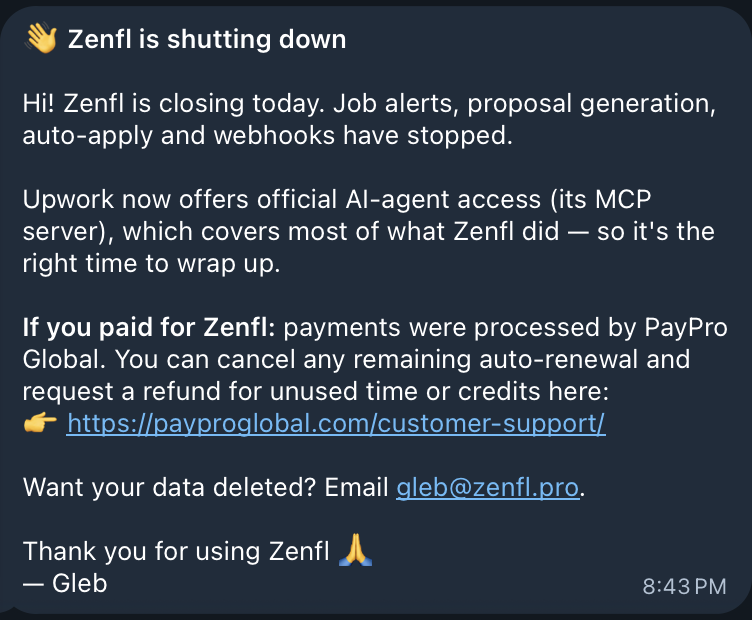
Hi! Zenfl is closing today. Job alerts, proposal generation, auto-apply and webhooks have stopped.
Upwork now offers official AI-agent access (its MCP server), which covers most of what Zenfl did, so it's the right time to wrap up.
If you paid for Zenfl: payments were processed by PayPro Global. You can cancel any remaining auto-renewal and request a refund for unused time or credits here: payproglobal.com/customer-support
Want your data deleted? Email gleb@zenfl.pro.
Thank you for using Zenfl 🙏 — Gleb
Five days earlier he had listed the product for sale, saying he could not give it the focus it needed alongside full-time work. It did not find a buyer, and this is the outcome.
I run Vibeworker, a tool in the same category, so this post is a plug and I am not going to pretend otherwise. It is also a straight answer on the refund and on Upwork's MCP server, both further down. But the person reading this at 11pm is mostly thinking one thing: my alerts are gone, what do I use now. So that comes first.
Your Upwork alerts do not have to stay dead
If you came here looking for what to use instead of Zenfl, the answer is Vibeworker. I built it for exactly this workflow: watch Upwork continuously, filter for the jobs worth seeing, and get them to you the minute they post, with the full job, the client's history, and a proposal draft ready to review.
No Upwork login. No auto-apply. No card to start. Your first real test alert takes about two minutes.
Paid for Zenfl? Your refund comes from PayPro Global, not Zenfl. Steps are in the FAQ.
What you get, next to what you had
Vibeworker covers the core Zenfl workflow and adds more ways to receive jobs, more filtering, and no per-use charges.
| What you had in Zenfl | What you get in Vibeworker |
|---|---|
| Telegram alerts | Telegram bot, plus mobile and web push, RSS and webhooks. All included. |
| Keyword filters | AI match score per job, plus client filters: total spend, hire rate, payment status, budget, category, keywords. Unlimited filters. |
| Proposal credits, paid per use | Unlimited proposal drafts on Pro, generated from your own profile. A few included free so you can test them. |
| Webhooks (for developers) | Included on Pro, with the full job in the payload. Sends each job to another app, like Slack, n8n, Make, or your own agent. If you do not know what a webhook is, you do not need one. |
| 2-week trial | Free tier with the full ranked feed and a few proposal drafts, no card. Then a monthly or yearly Pro plan. |
| Support via the Telegram channel | Priority support, from the founder. You write, I answer. |
What the alert looks like
A job posts. Inside a minute it is in your chat. Full description, budget, the client's total spend, hire rate and payment status, and a one-tap proposal draft written from your own profile. You read it, decide, and either send or move on. The message has everything you need to decide, so you stop opening Upwork to check.
Every channel is included. Telegram, mobile push through the iOS and Android apps, browser push, RSS, and, for developers, webhooks that send the full job to another app. None of it is an add-on. Turn on the ones you use and ignore the rest.
Nothing is rationed. Unlimited filters and unlimited proposal drafts on Pro. You do not think twice before generating a draft, which is the point of having one.
You stay in control of your Upwork account. Vibeworker never signs in and never submits for you. You review and submit every proposal yourself.
I am the person building and supporting it. If something breaks, you are not opening a generic support ticket and hoping someone gets back to you. You message me directly, and I answer. Priority support, from the founder, is a feature, and it is one you had with Zenfl too, until you did not.
See your replacement before you pay
- Paste your Upwork profile.
- Vibeworker recommends your categories and builds two filters for you, a wide one and a narrow one. Edit either or add more.
- Connect Telegram or turn on push.
- Get a real test alert in your channel.
- Browse the free ranked feed and generate a few proposal drafts against real jobs, on us.
- Upgrade only when you want live alerts and unlimited drafts. Pro has a 14-day refund, so trying it for a month costs you nothing if it does not fit.
No card required. The whole thing takes about two minutes.
Every job posted while your alerts are off is already collecting proposals. Set Vibeworker up now, and you will see your first matching jobs before you pay anything.
Before you read the MCP breakdown
If all you want is your old alerts back, you do not need to bother with any of this. Start free and skip to the FAQ.
The rest explains why Upwork's MCP server is not a replacement for Zenfl's alerts, and why the two actually work together.
Is Upwork's MCP server a replacement?
Short answer: no.
Long answer: also no. It is closer to the opposite of a replacement, and once you see why, the shutdown notice reads differently.
The notice claims Upwork's MCP server "covers most of what Zenfl did." So it is worth listing what Zenfl did and checking each one.
Zenfl was three things:
- Job alerts. It watched the marketplace and sent a Telegram message when a job matched your filters.
- Proposal drafts. It wrote a first draft for a job you chose.
- Webhooks (for developers). It sent the job to another system so you could do your own thing with it.
Upwork's MCP server is a set of tools an AI agent can call: search jobs, draft a proposal, submit it, respond to an invitation, message a client, check your Connects balance. Every write is draft, then confirm. It is free, it uses your own Upwork login, and it is the first time Upwork has given anyone a sanctioned way to act on the platform from outside the website.
Against the list:
- Job alerts: no. Nothing in it watches anything. It answers when called and is silent otherwise. There is no push, no webhook, no event stream. Nothing wakes your agent when a job posts.
- Proposal drafts: partly. The MCP drafts from your profile and the job. So does every other tool. Not a differentiator either way.
- Webhooks: no. Same reason as alerts. It cannot send you anything, because it never initiates.
Zero of three replaced outright. What the MCP does add is the one thing Zenfl never had: submitting the proposal. An agent can search, draft and submit through Upwork's own channel, with you approving each one.
And this is not a gap Upwork can close in the next release. It is written into the terms of the thing. Their API and MCP Terms say job search access "does not authorize activity designed to enumerate or continuously monitor Upwork's available content corpus" (section 4.1). A separate clause says an agent may not go "independently selecting, ranking, scoring, or recommending among candidates, postings, proposals, or contracts using criteria the Agent itself determines" (section 5.9).
So by contract it cannot watch, and by contract it cannot judge. Those are the two things a job alert is. Upwork cannot ship an alert through the MCP without rewriting its own terms.
Here is the part the notice gets backwards. The MCP is a hand. It can act on Upwork, but it cannot see anything until something tells it where to look. A job feed is an eye. It sees every job the moment it posts, judges it against your filters, and until last month the only thing it could hand that to was you, on your phone.
Now it can hand it to an agent. A tool like Vibeworker watches the marketplace, matches each job against the filters you set, and fires a webhook with the full posting to whatever you point it at. Point it at an agent that has the Upwork MCP connected and you have the whole loop: the feed sees the job, the agent drafts through Upwork's own tools, you approve the send. The eye and the hand, and the hand is finally official. Here is the build, start to finish.
That is not a feed tool being replaced. That is a feed tool becoming the trigger for the thing Upwork just shipped. The MCP made real-time job data more valuable, not less, because for the first time there is a sanctioned place to send it.
The tools that should be worried are the auto-apply tools. Their entire product was a browser robot submitting proposals on an account that was not supposed to have a robot on it. Upwork just built the sanctioned version of that, made it free, and put a draft-confirm step on every submit. Everything those tools did in the dark, the MCP now does in the open, and the ones that keep running in the dark are competing with the platform's own hand. Zenfl was never one of those. It was a feed, and feeds are the part the MCP cannot do.
So, for the freelancer who used Zenfl because they wanted a Telegram message thirty seconds after a good job posted: the MCP is not the thing that does that, and it is not allowed to become it. You need an alert tool, same as you did last week.
For the builder: the MCP is the missing half you were waiting for. What you need on the other side of it is a feed that watches in real time and speaks webhook. That is what this category of tool is for, and it just got more useful.
Either way, the feed is the part you still need, and it is about two minutes away.
Questions Zenfl users are asking
How do I get a refund from Zenfl?
Through PayPro Global, not through Zenfl. PayPro was the merchant of record for every Zenfl payment, so the refund does not depend on Zenfl still existing.
- Go to payproglobal.com/customer-support.
- Look up your order with the email you paid with. The order number is in your PayPro confirmation email if you need it.
- Cancel any remaining auto-renewal so nothing else is charged.
- Request a refund for the unused part of your subscription and for any unused proposal credits. Put both in the same ticket.
PayPro processes this as the seller. You are not waiting on a one-person company to answer.
I was charged after Zenfl closed. What do I do?
Cancel the auto-renewal at PayPro Global first, then request the refund for that charge in the same ticket. A renewal that went through after September 16, 2026 paid for a service that no longer exists, which is the clearest refund case there is. If PayPro does not answer in a reasonable time, your card issuer or PayPal can open a dispute for a service not delivered.
What happens to my unused Zenfl proposal credits?
They are gone as a product feature, but they are refundable. The founder's notice says to request a refund for "unused time or credits", so include the credit balance in your PayPro refund request along with the unused subscription time.
How do I delete my Zenfl account and data?
Email gleb@zenfl.pro and ask for deletion. That is the address given in the shutdown notice. There is no self-serve option because the site is offline.
Is Zenfl coming back?
Nothing suggests it. The founder listed the product for sale on September 11, 2026, it did not find a buyer, and five days later he closed it and told users to request refunds. A sale after the fact would mean a new owner rebuilding the service from a stopped state. Plan as if it is gone.
Will the Zenfl Telegram bot keep working?
No. The bot stopped delivering at the same time the site went offline on September 16, 2026. The Telegram channel still exists, which is where the shutdown notice was posted, but nothing is sent through the bot any more.
Why did Zenfl shut down?
Two reasons given by the founder. First, in the sale listing, that he could not give it the focus it needed alongside a full-time job. Second, in the shutdown notice, that Upwork's official MCP server "covers most of what Zenfl did", so it was the right time to stop. The second reason does not hold up. Zenfl was a job feed, and the MCP cannot watch the marketplace or send alerts, by design and by Upwork's own terms. The section above walks through it.
Can I use Upwork's MCP server instead of Zenfl?
Not as an alert tool, and not for the reason the notice gives. Upwork's MCP server is a set of tools an AI agent can call to search, draft and submit on Upwork. It only acts when called, it cannot watch the marketplace, and Upwork's own terms forbid using it to monitor the feed or to rank jobs on the agent's own judgment. What it is good for is the acting half: point a real-time feed like Vibeworker at an agent that has the MCP connected and the feed sees the job, the agent drafts through Upwork's own tools, you approve the send. A freelancer who wants a message on their phone when a good job posts still needs an alert tool.
Does Vibeworker have a Telegram bot like Zenfl?
Yes. Connect the Vibeworker Telegram bot to a filter and each matching job is sent to your chat inside a minute of posting, with the full description, the client's spend, hire rate and payment status, and a one-tap proposal draft. Mobile and web push, RSS and webhooks are also included, so you are not tied to Telegram.
Does Vibeworker auto-apply?
No, and that is deliberate. Vibeworker never signs in to your Upwork account and never submits anything for you. It drafts the proposal, you read it and send it. Auto-submission is against Upwork's terms and accounts get banned for it. If you want an agent that applies for you, here is how to do that within Upwork's rules, using Upwork's own MCP server with Vibeworker as the trigger.
Can I import my Zenfl filters into Vibeworker?
There is no import, and you do not need one. Paste your Upwork profile during setup and Vibeworker recommends your categories and builds two filters for you, a wide one and a narrow one. You can edit either or add more. The whole thing takes about two minutes, and a real test alert is sent to your channel before you pay anything. Start here.
Is there a free trial?
There is a free tier with the full ranked feed and a few proposal drafts, so you can see what is posting in your categories and test the drafts against real jobs before you decide. No card. Live alerts and unlimited drafts are on Pro, with a 14-day refund if it is not for you.
Does Vibeworker touch my Upwork account?
No. It never submits anything for you and never asks for your Upwork login. You review and submit every proposal yourself.
No card required. About two minutes to your first test alert.
A note on Zenfl
Zenfl was built and run by one person, part-time, for several years, and it stayed fast the whole time. Speed is the entire job in this category, and keeping a bot that fast while holding down a full-time job is not a small thing. It survived Upwork shipping its own alerts and survived the AI wave that took out plenty of funded tools. Closing it cleanly, with a refund path and a data-deletion address, is the right way to do it, and more than most small tools manage.
To Gleb, if you read this: good run. To everyone who used it: your alerts do not have to stop. Get them running again.

Michael Watkins
Founder of Vibeworker. Helping freelancers win the Upwork game through speed and data.
Stop missing the jobs that matter
Vibeworker watches the Upwork feed and alerts you the moment a high-fit job appears — before the proposals pile up.
Get started free →Keep reading
Is DevSnipe Down? The Site Is Returning 404 (October 2026)
DevSnipe, the freelance job finder and auto-apply extension, has been returning a 404 on every page since at least October 9, 2026. What is known, what to do if you paid or have the extension installed, and what to use for Upwork job alerts in the meantime.
Best Zenfl Alternatives for Upwork Freelancers in 2026
Zenfl shut down on September 16, 2026. Here's where its users can go: how the remaining Upwork job alert tools compare on delivery, proposals, filter limits, and what each includes at the base price.
UpAlerts Not Working? How to Fix It, and What to Use Instead
UpAlerts notifications late, missing, or stopped completely? Here are the fixes to try first, in order, and a lower-cost alternative with mobile apps, stronger filters and direct founder support if they do not work.