How to Cancel UpAlerts and Get a Refund (2026)
This page covers how to cancel an UpAlerts subscription, how to ask for your money back, and why some people see a larger charge than they expected. Everything here was checked on September 7, 2026. Apps change, so treat the screenshots as a snapshot of that date.
If you just want a cheaper tool that works, sign up for Vibeworker free, or skip to how it compares.
Were you charged $90.17 instead of $18.99?
If so, here is why.
On Android, the UpAlerts in-app paywall shows the plan as Monthly, $18.99/month. The button says Start Monthly Subscription, and the small print underneath says "$18.99/month after the trial."
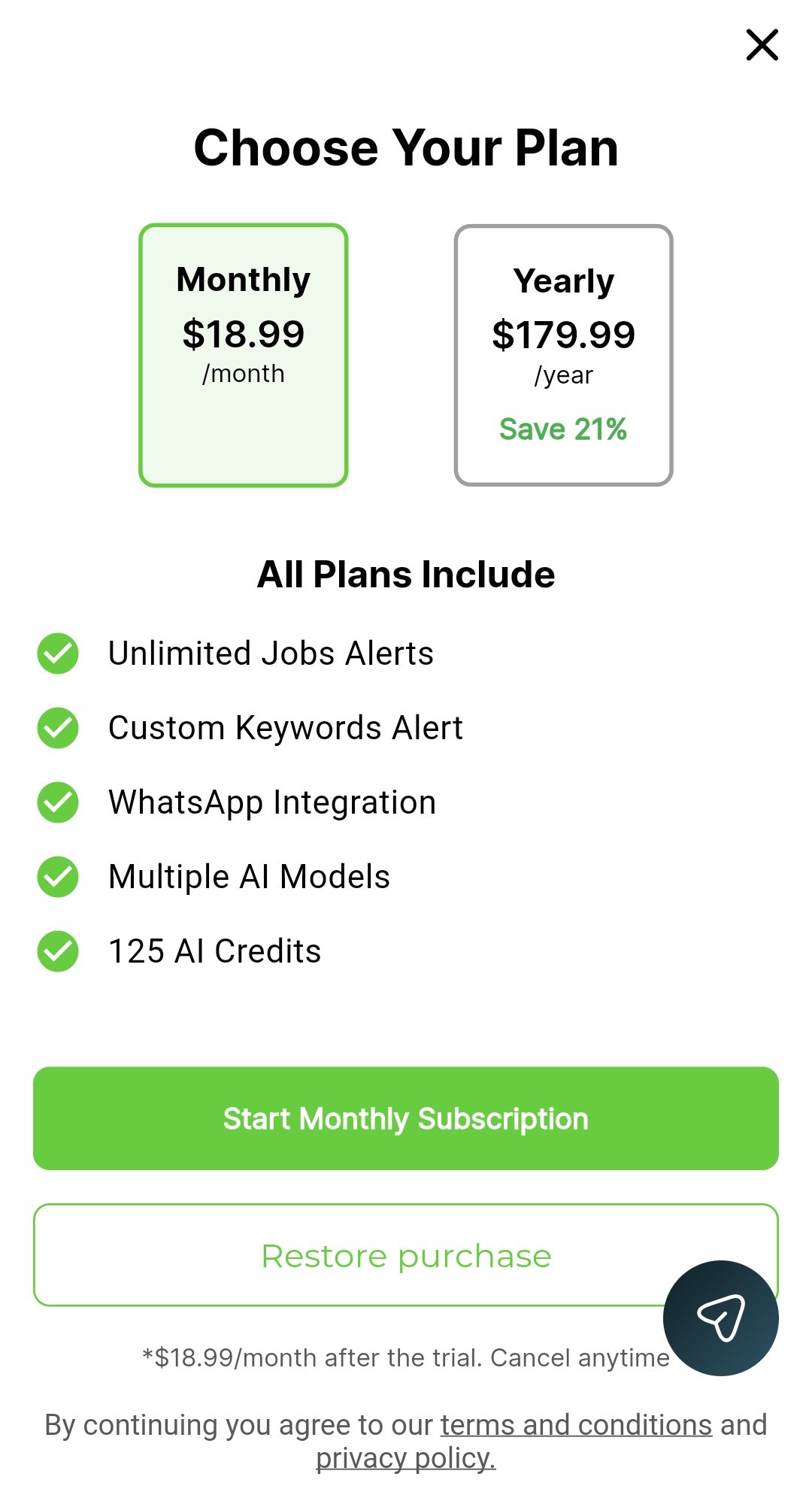
Tap that button, and the Google Play purchase screen for the same subscription shows a 3-day free trial, then $90.17 plus tax for a 6-month period, then $18.99 a month:
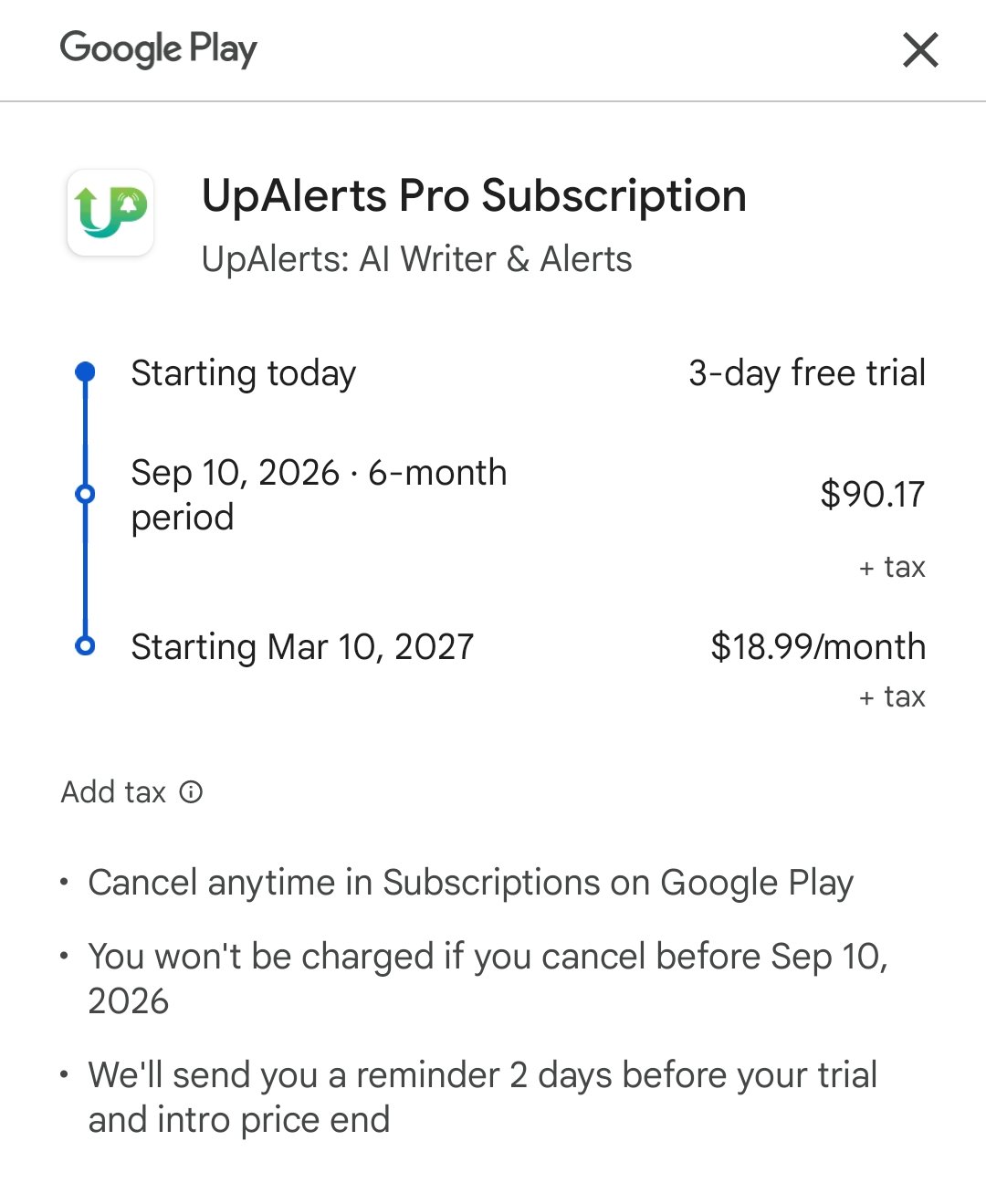
So when the trial ends, the first charge is $90.17 plus tax for six months, not $18.99 for one month. The Google Play screen does show these terms before you confirm. The app's own paywall, which is the screen you read first, says monthly.
$90.17 over six months works out to about $15 a month, so it is cheaper per month than the monthly price. It is also six months paid up front. If you expected to pay for one month to try it, the steps below cover how to ask for a refund.
We saw the same setup twice, a month apart: in mid-August and again on September 7, 2026.
Is the UpAlerts trial 3 days or 7 days?
It is 3 days. That is what Google Play shows in the screenshot above, and it is when the $90.17 charge happens.
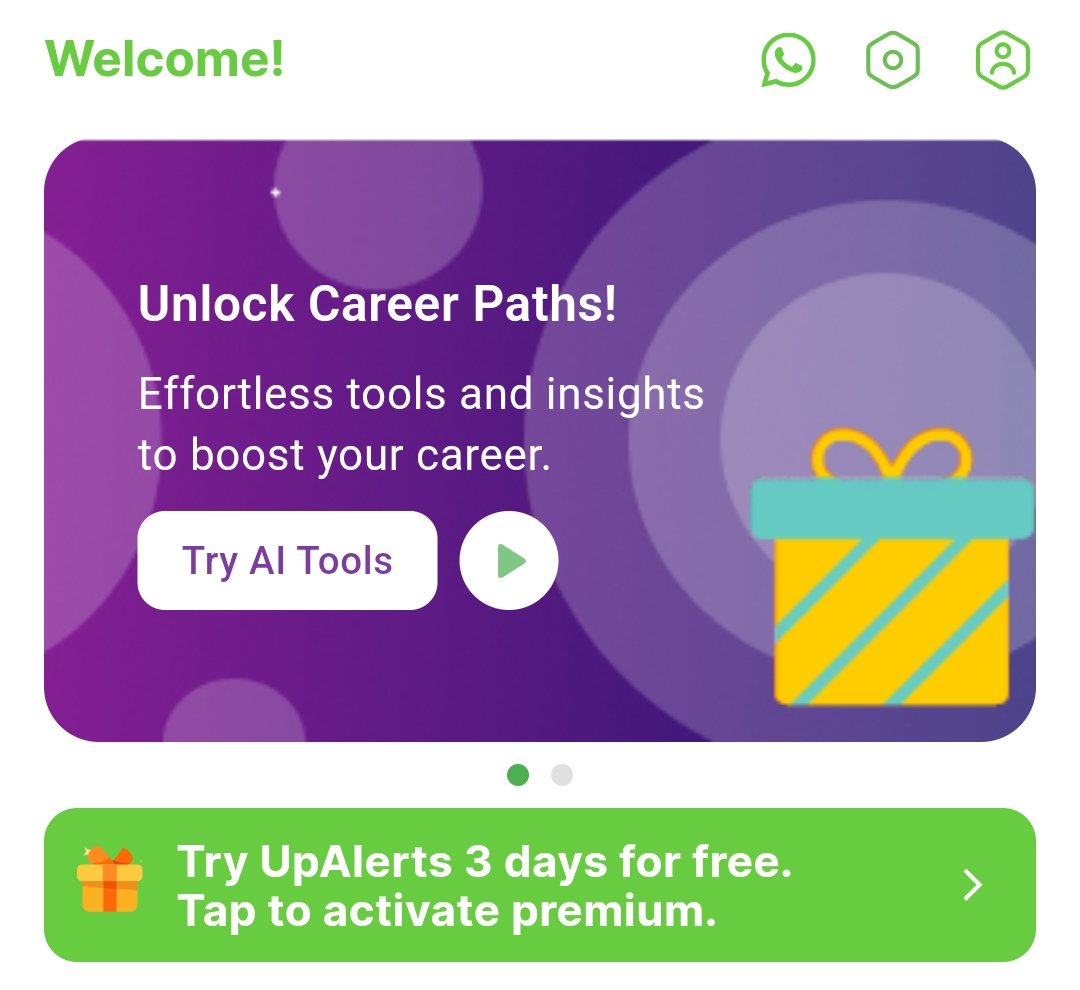
The app itself says both. The Home screen says "Try UpAlerts 3 days for free":
The Jobs screen says "Start My 7-Day Free Trial" and "Nothing charged during the trial":
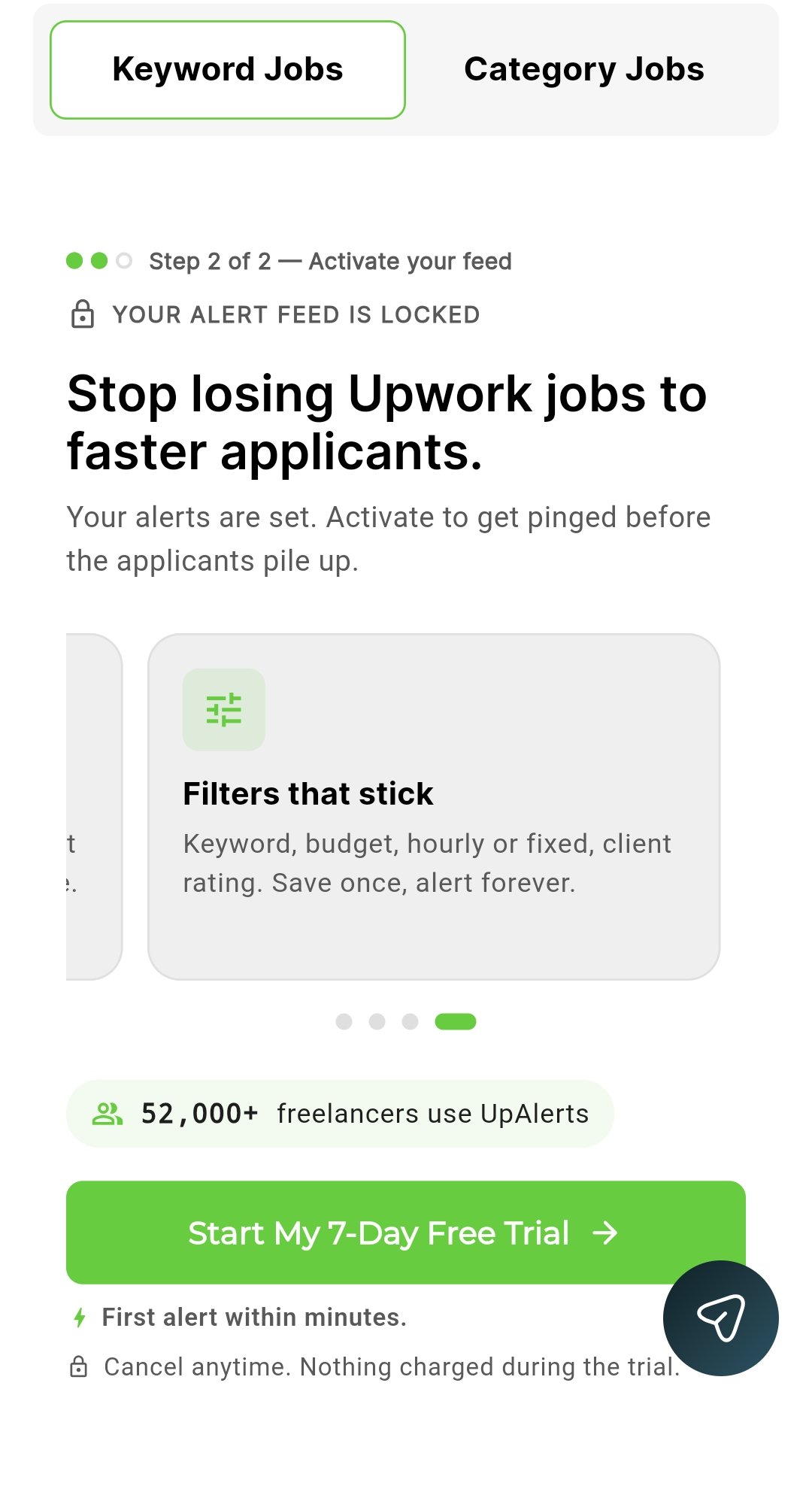
If you started the trial from the Jobs screen expecting 7 days, you get charged on day 3. If you are inside the trial now and do not want to pay, cancel today using the steps below. You keep access until the trial ends.
How to cancel UpAlerts
Cancelling stops the next renewal. It does not refund what you have already paid. That is a separate step, covered in the next section.
On Android:
- Open the Google Play Store
- Tap your profile picture, then Payments & subscriptions → Subscriptions
- Tap UpAlerts, then Cancel subscription
On iPhone:
- Open Settings and tap your name
- Tap Subscriptions
- Tap UpAlerts, then Cancel Subscription
Uninstalling the app does not cancel the subscription. You have to cancel through Google Play or the App Store.
If you are still inside the free trial, cancel now anyway. You keep access until the trial ends, and you will not be charged.
How to get a refund
Refunds for app store purchases are handled by Google or Apple, not by the app itself.
Google Play, within 48 hours of the charge:
- Go to play.google.com and sign in
- Open Payments & subscriptions → Budget & history (or your order history)
- Find the UpAlerts charge and choose Request a refund
- Pick a reason. If you were charged for six months when you expected one, say so plainly.
Google Play, after 48 hours: Google usually sends you to the developer. Use the developer contact email on the UpAlerts Play Store listing, include your order number (it starts with GPA.), and state the amount and date of the charge. If you get no answer, go back to Google Play support and tell them the developer did not respond.
iPhone:
- Go to reportaproblem.apple.com and sign in with your Apple ID
- Choose Request a refund
- Pick a reason, then select the UpAlerts charge and submit
Apple usually replies within a couple of days.
Before you ask: what to have ready
- The date and amount of the charge
- Your Google Play order number (GPA.) or the Apple receipt email
- One clear sentence on what went wrong, for example: "The app showed a monthly plan at $18.99. I was charged $90.17 for six months." or "The app said the trial was 7 days. I was charged after 3."
Short, factual requests get approved faster than long ones.
A cheaper alternative with no surprises
If you are leaving UpAlerts because of the price or the billing, here is what Vibeworker costs and how it bills.
- $12/month in Pakistan, or $119/year. UpAlerts is $18.99/month, the same in Pakistan as in the US.
- The price on the button is the price you pay. Monthly means monthly. Yearly means yearly, and it says so.
- Everything included. Unlimited alerts, filters and AI proposals, every notification channel, API and webhook access. No credit packs.
- Browse the job feed free, with no card and no time limit, before you pay anything.
- 14-day refund, no questions asked on web subscriptions. You email me, I refund it.
- Android and iPhone apps, with alerts straight to your lock screen. A web subscription works in both apps.
- Support from the founder. Reach me directly on Telegram, email or WhatsApp.
For the full breakdown, see the Vibeworker vs UpAlerts comparison. If your problem is late or missing alerts rather than billing, see how to fix UpAlerts not working.
Vibeworker is $12/month in Pakistan with everything included, and a 14-day refund if it is not for you. Start on the web →, then get the Android app for your alerts.

Michael Watkins
Founder of Vibeworker. Helping freelancers win the Upwork game through speed and data.
Stop missing the jobs that matter
Vibeworker watches the Upwork feed and alerts you the moment a high-fit job appears — before the proposals pile up.
Get started free →Keep reading
UpAlerts Not Working? How to Fix It, and What to Use Instead
UpAlerts notifications late, missing, or stopped completely? Here are the fixes to try first, in order, and a lower-cost alternative with mobile apps, stronger filters and direct founder support if they do not work.
Vibeworker vs UpAlerts: An Honest Comparison (2026)
We paid for UpAlerts and used it. How it compares to Vibeworker on price, free access, notification channels, and what is actually built versus what is still listed as coming soon. Tested September 2026.
Best Upwork Job Alert Tool for Pakistani Freelancers
Compare what actually matters in an Upwork alert tool if you are freelancing from Pakistan: speed, mobile delivery, better job triage, and a workflow that does not depend on watching the feed all day.